Posts

Showing posts with the label Windows Forms

C# Thinking outside the norm
Image
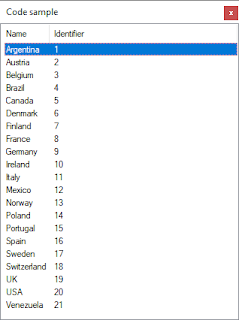
Introduction Had a forum question today where a developer wanted to load a TreeView in Windows Forms were data was read from a database and in turn caused the user interface to become unresponsive. They asked about BackGroundWorker component or asynchronous way (async/await task) but had never worked with any of these. My solution Since the idea is to use a delegate/event this path will work on any control ranging from TreeView to ListView or DataGridView the example given uses a ListView. Start off with a class which represents returning data. using  System; namespace  IteratingCodeSample.Classes {      public   class   Countries     {          public   int  CountryIdentifier {  get ;  set ; }          public   string  Name {  get ;  set ; }        ...

VB.NET Working with Delegate and Events

Introduction From hobbyist to seasoned developers delegates are avoided or attempts are made to understand them, which in many cases is met with frustration. I see questions on various forums where code could be refactored by using delegates and when making suggestions to use delegates generally the response is something like “that is over my head, what I have works!”. Well just because code works does not mean there is room for refactoring. Search the Internet for VB.NET delegates and find out there are an abundance of post while the majority are not fully working examples and may be untested which can lead back to frustration. The first mistake some coders make is not reading Microsoft documentation on delegates or think outside the box and study C# code samples and a decent C# to Visual Basic converter as there are more code samples in C# than Visual Basic. One must understand that there are cases like with MulticastDelegate class there is syntactic difference on how to use them ...

Get/Set app.config values for WPF and Windows forms using C#

Image
In Windows forms developers sometimes need a place to store information like connection strings or data binding to controls. This is typically done usually under project properties by creating a setting which generates xml e.g. < userSettings >   < WindowsFormsApp1.Properties.Settings >     < setting   name = " Author "   serializeAs = " String " >       < value > Karen Payne </ value >     </ setting >   </ WindowsFormsApp1.Properties.Settings > </ userSettings > Although this works sometimes we want more control so we can have < appSettings >   < add   key = " DatabaseServer "   value = " .\SQLEXPRESS "  />   < add   key = " Catalog "   value = " NorthWind2020 "  />   < add   key = " SortColumn "   value = " CompanyName "  />...

WPF and Windows Forms Data Annotations

Image
There is a lot that the .NET Framework offers and for some developers they may not find those hidden gems that others tend to find. One of these gems is data annotations which on an average web search tends to pull up ASP.NET and in some cases WPF. When a developer new to WPF finds information on data annotations and has not learned MVVM yet for whatever reasons they may not pursue this path. Similarly, the same may hold true for Windows Form developers. So for those new to WPF and those Window form developers who are open to data annotations check out the following GitHub repository .

Entity Framework Core code samples for moving away from conventional data operations

Image
Spending years in various forums answering questions what is surprising is Windows Form developers (both newcomers and season coders) are still using TableAdapter, DataAdapter or connection and command objects to interact with databases. A case may be made for each of these but they are not going to work well when considering cross platform, web solutions and in general rich user interfaces. When the chance presents itself I will suggest trying EF or EF Core and the response typically is something along the lines of "I'm just building a simple application" or similar response then sometime later that simple application has grown considerably and now warrants looking at EF or EF Core. In many cases it's too late or they just want to get the application done quickly. So over the past year I've been writing code samples to target Windows Forms developers. The downside is limited time to have a well rounded set of code samples. The goal is to start out simple with com...

Introducing Asynchronous coding to VB.NET novice developers

Many developers, hobbyist and weekend coders rely on searching the web for solutions to a problem rather than first reading documentation where good solutions are too abstract or in the case of Windows Forms or WPF code samples are done in a window or form. These people tend to pick the easiest solution and roll with it. A common question, how do I perform an operation and keep my application responsive? Solutions tend to range from Application.DoEvents to using a BackGroundWorker component with no mention of asynchronous solutions or an asynchronous solution is shown but like the first two are shown directly in a form. The person asking tends not to care which is better but instead which is easier to implement because to the novice coder easier is always better. If the following is shown and along with other code samples without using classes they tend not to use classes in the future. Imports  System.Threading Public   Class   Form1      Priva...